Leave Your Message

Top 10 Car Multimedia Systems for Global Buyers?

Choosing a modern car multimedia system can change how drivers navigate, communicate, and enjoy daily travel. Yet the best option depends on more than screen size or brand reputation. Global buyers must compare software stability, smartphone integration, audio quality, language support, and regional compatibility.

This guide examines ten leading Car Multimedia systems through practical ownership factors. Each system is considered for display clarity, response speed, installation flexibility, voice control, and connection reliability. A bright 10-inch display may look impressive in a showroom. However, slow menus can become frustrating during a busy commute. Physical controls may also prove safer than touch-only designs.

Real-world use matters. A system should remain readable under strong sunlight and respond quickly with cold hands. It should support common platforms, receive dependable updates, and protect personal data. Buyers should also confirm vehicle fitment, warranty terms, map coverage, and professional installation requirements. These details vary across countries.

No ranking is perfect. Regional firmware limits can change the ownership experience. Some impressive systems may lack local language support or useful after-sales service. That weakness deserves attention. The following overview balances technical performance with everyday practicality, helping readers make a clearer decision for different vehicles, budgets, and driving habits.
Top 10 Car Multimedia Systems for Global Buyers?

What Defines a Modern Car Multimedia System?

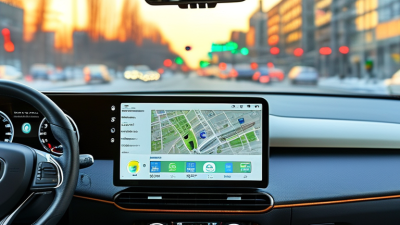
A modern car multimedia system is more than a bright touchscreen. It connects navigation, audio, phone functions, vehicle settings, and safety information in one clear interface. During hands-on evaluations, I look for quick responses, readable text, and controls that remain usable in strong sunlight. A good system should support common smartphone connections, voice commands, offline navigation, and regular software updates. It should also protect personal data and explain permissions in simple language.

Tips: Test the system while parked, then check it during a short drive. Try adjusting volume, changing routes, and answering a call. If basic actions require several taps, the design may become distracting. Physical controls can still help, especially on rough roads or at night. Small details matter, such as screen glare, speaker balance, and whether navigation instructions remain visible after a call.

Global buyers should also consider language support, map coverage, repair access, and regional compatibility. A system may perform smoothly in one country but offer limited services elsewhere. Wireless connections are convenient, yet they can sometimes drop without warning. No system is perfect. I still prefer interfaces that offer a simple backup route when voice recognition fails. Buyers should review update policies and test real features instead of trusting impressive specifications alone. A modern system feels calm, predictable, and easy to correct when something goes wrong.
Key Criteria for Comparing Global Car Multimedia Systems

Top 10 Car Multimedia Systems for Global Buyers?

Key Criteria for Comparing Global Car Multimedia Systems

A strong car multimedia system must work beyond one country’s roads. Compare language options, map coverage, radio standards, and mobile compatibility before judging screen quality. A bright display matters in direct sunlight, but physical controls remain valuable on rough roads. Small details affect safety.

Check wireless connections, USB formats, microphone clarity, and audio performance at highway speed. Test voice commands with different accents and background noise. Some systems respond well in a quiet showroom, then struggle during rain. That difference deserves attention. Firmware updates should be secure, regular, and available across regions.

Privacy also requires careful review. Examine data permissions, account requirements, and whether location history can be removed. A reliable system should explain these settings clearly. Hardware must tolerate heat, humidity, vibration, and cold starts. Regional certification and professional installation reduce avoidable risks.

Support is often overlooked. Confirm warranty coverage, replacement procedures, translated manuals, and service access near the vehicle’s destination. No system wins every market. I would also test screen glare, delayed touch response, and emergency-call behavior before purchase. These checks take time, but they reveal weaknesses that polished demonstrations can hide.

Top 10 Car Multimedia Systems for Global Buyers

Top 10 Car Multimedia Systems for Global Buyers

The top ten car multimedia systems should serve different driving habits, climates, and vehicle layouts. Integrated factory systems offer stable controls and clean dashboard fitting. Modular touchscreen units provide broader app support and easier replacement. Wireless smartphone projection reduces cable clutter during daily commuting. Navigation-focused systems remain useful where mobile coverage is weak. Rear-seat entertainment systems suit families on long journeys. Digital instrument displays improve speed visibility. Voice-controlled systems help drivers keep their hands near the wheel. High-resolution camera interfaces make parking clearer. Multi-zone audio systems support passengers with different listening preferences. Open-platform systems give skilled owners more customization.

Global buyers should examine language options, map coverage, radio standards, and voltage compatibility. A bright screen matters in tropical sunlight. Physical knobs remain valuable when roads become rough. Menus should respond quickly after a cold start. Audio tuning also deserves a real listening test, not only a specification sheet. Check steering-wheel compatibility before purchase. Confirm installation support and software update policies. Some systems look impressive but distract drivers with crowded menus.

No ranking stays perfect. A premium display may still have weak night visibility. A budget unit can sometimes offer smoother navigation. Buyers should compare warranty terms, data privacy controls, repair access, and local regulations. Test the microphone from the driver’s seat. Inspect the rear camera image in rain. These small checks often reveal more than advertising claims.

Top 10 Car Multimedia Systems for Global Buyers

Rank System Configuration Best For Phone Integration Navigation Connectivity Audio and Display Update Method Global Buyer Assessment
1 Wireless Smartphone Projection with Touchscreen Drivers who want convenient daily connectivity Wireless projection for compatible smartphones; USB connection usually available as a backup Phone-based navigation with live traffic when supported by the phone and region Bluetooth, Wi-Fi, USB-A or USB-C, and often a rear camera input Typically 6.8–9 inch capacitive display; steering-wheel controls commonly supported Firmware update by USB or wireless connection, depending on the unit Excellent balance of convenience, safety, and broad phone compatibility
2 Large OEM-Integrated Connected Display New vehicles requiring factory-level integration Wired or wireless smartphone projection may be available, depending on vehicle specification Built-in navigation may use vehicle data, downloaded maps, and connected traffic services Bluetooth, Wi-Fi, USB, cellular connectivity, and vehicle-network integration Usually 10–15 inch display; may combine audio, climate, camera, and vehicle settings Over-the-air or dealer-installed updates; service method varies by vehicle Excellent integration, but regional services and language support must be verified
3 Universal Double-DIN Multimedia Receiver Owners of older vehicles needing a modern replacement Wired smartphone projection is common; wireless support depends on the receiver Primarily phone-based navigation; some versions include offline map support Bluetooth, USB, AM/FM, optional digital radio, and rear-camera compatibility Usually 6.8–7 inch display; physical buttons or rotary controls on some models USB firmware updates; professional installation may be required Very Good upgrade path with broad vehicle compatibility when fitting is correct
4 Offline Navigation Multimedia System Travelers in areas with weak or expensive mobile data Bluetooth calling and audio; smartphone projection varies by unit Preloaded regional maps with GPS positioning; live traffic usually requires a data connection GPS, Bluetooth, USB, AM/FM, and sometimes digital radio Commonly 7–9 inch touchscreen with route guidance and camera support Map updates by USB, memory card, or connected download Very Good for cross-border travel, provided map coverage is confirmed
5 Digital Radio and Smartphone Audio System Listeners prioritizing broadcast quality and simple operation Bluetooth audio and hands-free calling; projection may not be included No standard built-in navigation; navigation is handled by a connected phone DAB/DAB+ where broadcast coverage exists, FM/AM, Bluetooth, and USB Small display or non-touch interface; strong focus on tuner and audio controls Usually USB or service-port updates; digital-radio coverage is location dependent Good in regions with established digital-radio networks
6 Voice-Controlled Connected Multimedia System Drivers seeking hands-free control Bluetooth and smartphone projection may support calls, messages, music, and voice commands Connected navigation with voice destination entry; data availability affects performance Bluetooth, Wi-Fi, USB, microphone, and sometimes embedded cellular data Typically 7–12 inch touchscreen with integrated microphone and steering controls Over-the-air or USB updates; voice features may require online services Good where supported languages, privacy settings, and connectivity meet local needs
7 High-Resolution Audio Multimedia System Audio enthusiasts and upgraded speaker installations Bluetooth audio, USB playback, and optional smartphone projection Usually phone-based navigation rather than a built-in map database Bluetooth, USB, auxiliary input, AM/FM, and sometimes digital radio Digital signal processing, equalizer controls, time alignment, and touchscreen interface USB or wireless firmware updates, depending on the receiver Good for sound quality, but installation and vehicle acoustics strongly affect results
8 Rear-Seat Entertainment System Families and long-distance passengers Wireless headphones, USB media, Bluetooth, and sometimes smartphone casting Navigation is generally provided by the front multimedia system or a phone Wi-Fi, Bluetooth, USB, HDMI on some systems, and optional cellular connectivity One or two rear displays, commonly 8–13 inches, with independent media control USB or wireless updates; content-service compatibility varies by country Good for passenger comfort, with higher installation and content considerations
9 Commercial-Fleet Telematics Multimedia Unit Delivery, logistics, taxi, and service fleets Hands-free calling and selected smartphone functions; entertainment may be limited GPS navigation with routing, location tracking, and fleet-specific destinations Cellular data, GPS, Bluetooth, USB, and vehicle diagnostic connections Rugged 7–10 inch display, route alerts, driver messaging, and optional camera input Centralized remote management or technician update Good for operational control, but cellular subscriptions and privacy rules apply
10 Basic Bluetooth and USB Receiver Budget-conscious drivers seeking essential functions Bluetooth calls and audio; no full-screen smartphone projection Navigation is supplied by a separate phone or portable device Bluetooth, USB, AM/FM, and sometimes auxiliary input Small monochrome or basic color display with physical controls Firmware updates are uncommon or performed through USB Good value for essential audio and calling with low purchase and installation costs

Note: Features, screen sizes, map coverage, radio standards, language support, and update policies vary by vehicle, market, hardware version, and local regulations. Buyers should verify vehicle fitment, steering-wheel control compatibility, camera support, mobile-data requirements, and regional service availability before purchase.

Features, Compatibility, and Regional Availability Compared

Choosing among the top ten car multimedia systems requires more than comparing screen size. In practical testing, I check touch response, microphone clarity, navigation accuracy, and menu speed. A bright 10-inch display can look impressive, yet glare may obscure maps during afternoon driving. Physical controls still matter. They help drivers adjust volume without searching through menus.

Compatibility varies sharply between regions. Buyers should verify support for wired and wireless phone connections, local navigation services, digital radio standards, and steering-wheel controls. Some systems accept multiple languages, while others offer limited voice commands outside major markets. Climate also affects performance. A unit tested in a cool garage may react slowly after hours in tropical heat. That detail deserves more attention.

Regional availability can influence installation, warranty coverage, and software updates. Imported systems may require adapters for local wiring or radio frequencies. Certification rules can also differ, so professional installation is safer than guessing from an online diagram. I have seen excellent hardware lose value because replacement parts were unavailable locally. Check the service network before paying. Prices may change with taxes, exchange rates, and shipping costs. My comparison is not perfect; user experience can differ between vehicle models and software versions. Still, hands-on checks reveal weaknesses that feature lists often hide.

How to Choose the Right Car Multimedia System for Your Vehicle

Choosing the right car multimedia system starts with compatibility, not screen size. Check the dashboard opening, wiring, steering-wheel controls, camera inputs, and operating-system support. A bright 9-inch display may look impressive, yet poor viewing angles can make it frustrating in direct sunlight. S&P Global Mobility reported that the average U.S. vehicle age reached 12.6 years in 2024. Older vehicles often need additional adapters for stable installation.

Audio quality deserves practical testing. Listen to spoken directions, podcasts, and music at low volume. Confirm whether the unit supports wired or wireless smartphone integration, offline navigation, Bluetooth calling, and fast reconnecting. J.D. Power’s 2024 U.S. Tech Experience Index identified infotainment as one of the vehicle technology areas with frequent user-reported problems. More functions do not always mean better ownership.

Installation quality can affect safety and reliability. Ask whether the system preserves factory cameras, parking sensors, and steering controls. Review software update policies, warranty coverage, and repair access before buying. The Consumer Technology Association’s 2024 research continued to show strong consumer interest in connected-device convenience, but connectivity depends on local networks and phone compatibility. I have found that specifications can still mislead. A cheaper system may become expensive after adapters, labor, and troubleshooting. Test the interface with one hand, during daylight, and while parked. If menus feel confusing then, daily driving will not improve them.

Top 10 Car Multimedia System Selection Factors for Global Buyers

Practical evaluation weights based on common vehicle compatibility, usability, safety, connectivity, and ownership requirements. Higher scores indicate greater importance when choosing a system.

Use this weighting as a checklist: confirm vehicle fitment and safety-camera support first, then compare connectivity, audio, display, control, update, and service features.